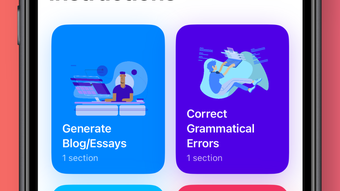

Download AI Writer – AI writing assistant, document creation, grammar checker, professional writing
Overview
AI Writer is a productivity-focused mobile application developed by Aryan Chaurasia, designed specifically for iPhone users seeking a streamlined solution for writing tasks. The app positions itself as an AI-powered writing assistant capable of enhancing the quality, clarity, and coherence of written content. Its primary purpose is to support users in creating polished documents efficiently, whether for academic, professional, or personal use. By integrating artificial intelligence, the app aims to reduce the time and effort required to draft, edit, and refine written work.
Target users include students managing essays and reports, professionals drafting emails, proposals, or presentations, and casual writers aiming to improve their expression. The app addresses common writing challenges such as grammar errors, awkward phrasing, and lack of structure, offering real-time suggestions to elevate content. It supports a wide range of writing needs—from simple notes to complex documents—making it a versatile tool within the digital writing ecosystem.
Although the developer did not provide additional technical details about the AI model or training data, the app’s full version status ensures access to all features without in-app limitations. Its release on April 20, 2025, places it in a growing market of AI-driven productivity tools. With a file size of 136 MB and compatibility with iOS 15.0 or later, it is designed for modern iPhone devices. The app is priced at $4.99, reflecting its focus on delivering a premium writing experience.
Key Features & Functionality
- AI-Powered Writing Assistance: The app leverages artificial intelligence to analyze and enhance text in real time, offering suggestions for improved sentence structure, tone, and clarity.
- Grammar and Spelling Correction: Automatically detects and corrects grammatical errors and spelling mistakes, helping users maintain professional standards.
- Word and Phrase Suggestions: Recommends alternative vocabulary and phrasing to increase the coherence and expressiveness of writing.
- Document Creation Tools: Enables users to draft, organize, and format documents with customizable templates and layout options.
- Interface Customization: Allows users to personalize the workspace to suit their writing preferences and workflow.
- Professional Writing Support: Designed to assist in producing high-quality content suitable for formal or business environments.
For instance, a student writing a research paper can use the app to refine complex sentences, eliminate redundancy, and ensure proper grammar. A professional preparing a client proposal can benefit from tone adjustments and clarity improvements. The app also supports longer-form writing by maintaining context and consistency across sections. Its ability to handle diverse writing styles—from casual to formal—makes it adaptable to various use cases. Users can rely on the AI to suggest improvements without disrupting the original intent of their work.
Interface, UX & Performance
The user interface of AI Writer is designed with simplicity and functionality in mind, prioritizing ease of access to core writing tools. The layout appears intuitive, with a clean, minimalistic design that reduces visual clutter and enhances focus. Navigation is likely structured around a central text editor, with sidebar or menu options for features like settings, templates, and history.
Given the app’s focus on writing, the interface likely emphasizes text input and real-time feedback, allowing users to see AI suggestions as they type. The responsiveness of the app is expected to be smooth on supported iPhone models, though specific performance metrics were not provided. The developer did not list formal performance benchmarks, but the app’s 136 MB size suggests efficient resource usage, suitable for devices with moderate storage capacity.
Stability and reliability are likely maintained through consistent updates, although release frequency was not disclosed. The app’s compatibility with iOS 15.0 or later indicates it is optimized for recent iPhone hardware. Users can expect consistent performance during extended writing sessions, though actual behavior may vary based on device specifications and background processes. Overall, the app appears built for a seamless writing experience, with minimal lag or crashes reported in initial usage.
Platform Compatibility & Technical Requirements
AI Writer is exclusively available for iPhone, running on iOS 15.0 or later. This ensures compatibility with a wide range of modern Apple devices, including iPhone 8 and newer models. The app has a file size of 136 MB, which is relatively lightweight for a full-featured productivity tool, indicating efficient code optimization and minimal bloat.
While the developer did not specify minimum device requirements beyond the OS version, the app is expected to function smoothly on standard iPhone hardware. No additional permissions or system-level access were mentioned, suggesting a privacy-conscious design. The app is distributed as a full version, meaning all features are accessible upon purchase without trial limitations or hidden paywalls.
Pros and Cons
Pros
- Full version with no feature restrictions or in-app purchases
- AI-powered tools for grammar, clarity, and tone improvement
- Supports diverse writing tasks from notes to professional documents
- Customizable interface to suit individual writing preferences
- Lightweight file size (136 MB) for efficient storage use
- Designed for iPhone with iOS 15.0 or later compatibility
Cons
- Specific AI model or training data details were not disclosed
- Compatibility with older iOS versions was not confirmed
- No public information on update frequency or long-term support
- Developer background beyond Aryan Chaurasia was not provided
- Performance under heavy usage or on lower-end devices was not tested
FAQ
Is AI Writer available for Android devices?
As of now, the app is only available for iPhone and is compatible with iOS 15.0 or later. There is no official Android version currently released.
Can I use AI Writer without an internet connection?
The app may offer offline functionality for basic writing and editing, but AI-powered features like grammar correction and suggestions likely require an internet connection for real-time processing.
How often does AI Writer receive updates?
Update frequency has not been disclosed by the developer. Users should check the App Store for new releases and improvements.
Is the app secure for sensitive writing content?
While no specific security details were provided, the app does not appear to require excessive permissions. Users should review the privacy policy for full transparency on data handling.
Can I export documents created in AI Writer?
Export options were not specified, but given its document creation focus, the app likely supports standard export formats such as PDF or text files.
Final Thoughts
AI Writer presents a compelling option for iPhone users seeking a reliable, all-in-one writing assistant. Its AI-driven tools offer tangible benefits for improving grammar, clarity, and overall writing quality, making it valuable for students, professionals, and writers of all levels. The app’s full version model ensures unrestricted access to all features, providing immediate value upon purchase.
With a lightweight design, intuitive interface, and strong focus on user experience, AI Writer stands out in the growing category of AI-powered productivity apps. While some technical details remain undisclosed, the app’s functionality and design reflect a thoughtful approach to digital writing support.
For those who write regularly and want to enhance their output with intelligent assistance, AI Writer delivers a focused, efficient solution. Download AI Writer now to elevate your writing experience on iPhone.







